eDesk's AI Agents empower you to deliver great customer care on demand. However, it's important to be transparent and in many regions, businesses are expected - and are legally obliged - to disclose to a customer if they are interacting with an AI Agent or Chatbot.
This help file explains how to use eDesk tools to inform your customers when they are interacting with an AI Agent or Chatbot.
Before you start
- You’ll need to be an Admin user to configure your AI Agents and Chatbots.
- Learn about eDesk's AI Agents and Chatbots.
01 Introduction
One of the key obligations for businesses using AI to communicate with customers is transparency: if a customer is interacting with an AI system, they should know.
This obligation appears in a growing number of laws and guidelines. The most significant is the EU AI Act (Regulation (EU) 2024/1689). Since 2 August 2026, Article 50 of the Act requires that people interacting with an AI system are informed they're interacting with AI, unless that's already obvious from the context.
The disclosure must be clear, easy to notice, and appear no later than the first interaction. A mention buried in your terms and conditions doesn't meet the standard, and neither does vague wording like "automated assistant" that never actually says AI.
This applies to any business serving customers in the EU, wherever the business itself is based. Similar transparency rules exist or are emerging in other regions, so clear disclosure is a sensible default even if you have no EU customers today.
Note: This help file is guidance, not legal advice. Your obligations depend on your specific circumstances — if in doubt, speak to your legal advisor.
02 Turning on AI disclosure for email
eDesk can append an AI disclosure to every email reply your AI Agent sends.
1. In the main menu, select the AI icon in the main menu to display the AI menu and landing page.
2. In the AI menu, select Agents and select the Agent for whom you need to enable AI disclosure for emails.
3. In the Tone & Identity tab, scroll down to the Email disclaimer section:
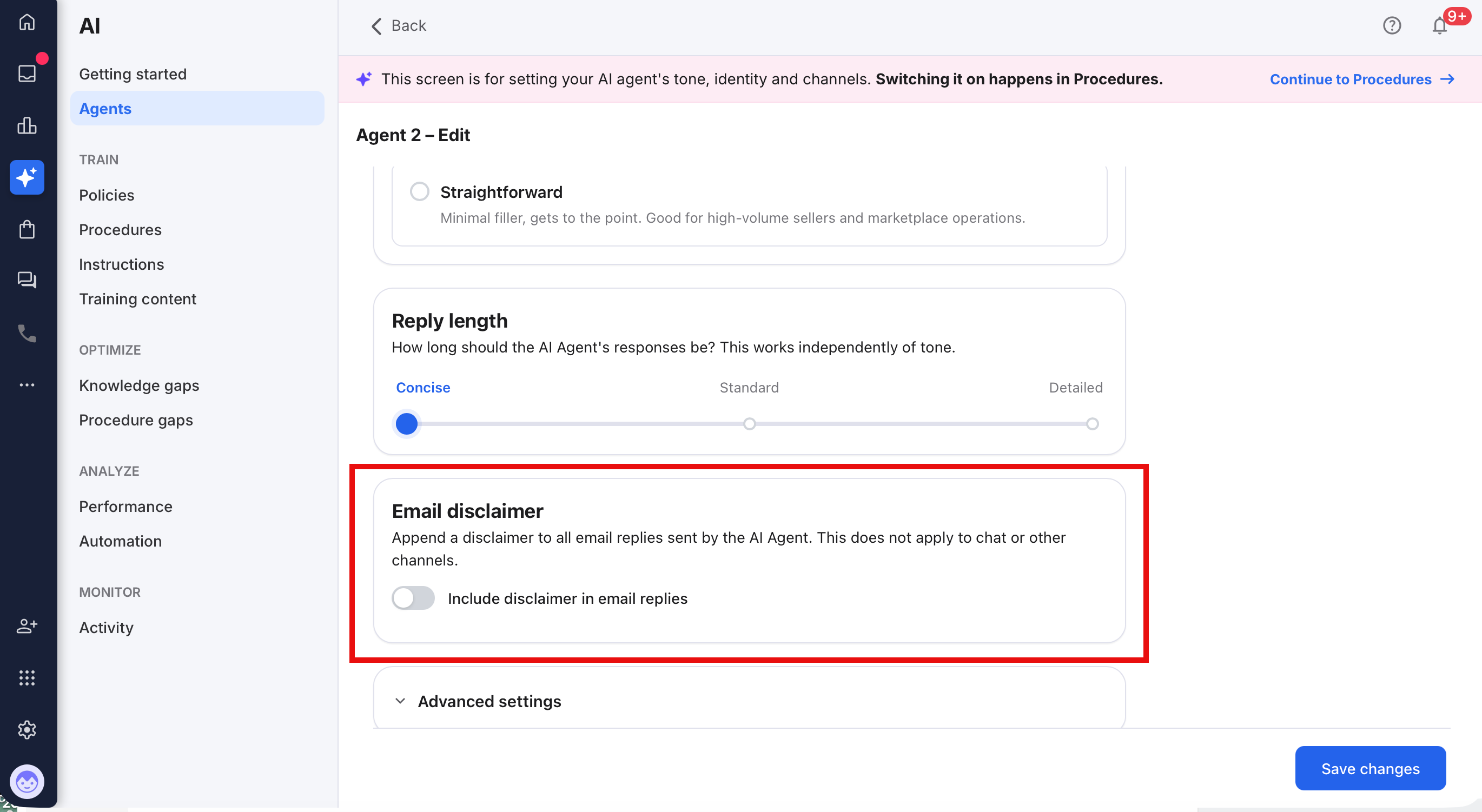
4. Select the Include disclaimer in email replies toggle to turn it on.
Once enabled, when this AI Agent replies for the first time in a given ticket, the email that the customer receives will include the disclosure text.
By default, eDesk provides the following compliant disclosure:
This reply was written by AI. You can reply at any time to reach our team.
Because the disclosure appears on the AI Agent's very first reply, your customer is informed at the first interaction, which is what the EU AI Act requires for email.
03 Turning on AI disclosure for chat
To stay compliant, make sure every chatbot you publish declares use of AI in its opening message, before the customer sends their first reply.
- If you build your chatbot from our Template, the declaration is already included in the opening message. Keep it in place and avoid deleting it when you customise the wording.
- If you create a chatbot from scratch, or replace the default opening message, you are responsible for adding your own declaration.
For example: "Hi there! You're speaking with our AI chatbot. Let's get started."
Just ensure that it remains obvious to the customer that they are speaking with AI.
04 Customising the disclosure text
You can edit the disclosure text to match your brand's voice. If you do, keep two things in mind:
Say "AI" explicitly. Wording like "automated response", "virtual assistant", or "digital helper" on its own may not meet the legal standard. Regulators have been clear that the disclosure needs to state plainly that the reply came from an AI system.
05 Translation
If you use eDesk's Auto Translation or AI Translation, your disclosure text is translated into your customer's language automatically, along with the rest of the reply. There's nothing extra to set up.
If you don't use either translation feature and you serve customers in non-English-speaking markets, consider writing your disclosure text in the language your customers use. A disclosure your customer can't read is unlikely to meet the "clear" standard.
06 Your responsibility
Under the EU AI Act, businesses deploying AI systems with their customers are responsible for ensuring those customers are informed they're interacting with AI. eDesk provides the disclosure tools described above, but it's your responsibility to enable them, or to inform your customers by other means. If you choose to keep AI disclosure switched off, you do so at your own risk.
We recommend keeping AI disclosure turned on. Beyond compliance, it's good practice: customers who know they're talking to an AI have better-calibrated expectations, and transparency builds trust in your brand.
07 Frequently asked questions
Q: "Does this apply to me if my business isn't in the EU?"
A: If you serve customers located in the EU, yes. The AI Act applies based on where your customers are, not where your business is registered.
Q: "Do I need to repeat the disclosure in every message?"
A: No. The requirement is to inform the customer no later than the first interaction. eDesk's disclosure appears on every AI Agent email automatically, which more than satisfies this.
Q: "I've customized my disclosure text. Will it still be translated?"
A: Yes. If Auto Translation or AI Translation is enabled, your custom text is translated the same way as the default text.
Q: "Can I turn the disclosure off?"
A: Yes, the setting is under your control. But if you turn it off, you'll need another way of informing customers they're interacting with AI, or you may be in breach of your legal obligations.
Further Reading
To learn more about eDesk's AI agent, see here.
To learn about AI Agent Procedures, see here.