Article 17 of the European General Data Protection Regulation (GDPR) gives individuals the right to be forgotten, meaning that they can ask you to delete any data you retain about them. The good news is that it's simple to delete customer data in eDesk and stay fully compliant with GDPR.
This help file shows you how to delete a customer's data from eDesk and explains what will and won't be deleted.
Before you start
- To delete customer data, you must have an Admin login to eDesk. If you don’t have an Admin login, you can request one from an Admin user within your business.
01 Introduction
When a customer sends a GDPR erasure request, GDPR stipulates that you must respond by deleting their customer data.When you delete customer data in eDesk:
- the customer's personal details are deleted from all channels.
- the customer's tickets and orders are not deleted but are anonymised to remove any personal details.
02 What exactly is deleted?
When you delete a customer's data in eDesk, the following personal details are removed permanently from eDesk:- Customer profile
In the customer's profile, their name becomes "Removed Customer", their email becomes customer.deleted@edesk.com, and their phone numbers are cleared. - Ticket messages
In the customer's tickets, the subject and body replaced with «REDACTED», including archived copies. Translations and original message files are deleted. Rating comments are redacted; scores are kept. - Attachments
In the customer's tickets, all attached files are deleted. - Ticket details
In the customer's tickets, AI summaries and AI reply suggestions are deleted. Ticket subject and preview text are redacted. Ticket custom field values are deleted. - Orders
In the customer's orders, the billing/shipping name and address are masked (all address lines, city, county, district, state, postal code, country). Order notes are redacted. Order custom field values are deleted. Free-text return reasons are redacted. - Search
The customer's tickets are not returned in search results. See next section for Orders behaviour in Searches.
03 What is not deleted?
When you delete a customer's data in eDesk, the following continue to exist in eDesk:- Orders
The customer's orders continue to exist and display dates, statuses, amounts, and items. All personal information is masked, redacted, or deleted, as per the previous section of this document. - Tickets
The customer's tickets continue to exist and display dates and message entries with their text redacted. - Return records
Records of the customer's returns are kept, but the Reason field (which is free text) is deleted. - Reporting
Response and handling time metrics might include data related to the customer, however these are simply metrics and do not contain customer personal information. - Search
Orders can be returned in search results but all personal information will be masked, redacted, or deleted.
04 After deletion
- The customer appears as "Removed Customer" in the customer list, ticket sidebar, orders, and templates.
- Their tickets are closed and marked invalid, so they no longer appear in ticket lists such as To do or Waiting.
- Your organization's billing is not reduced because a customer's data has been deleted - tickets already counted towards the monthly bill continue to be included in the count.
- AI Agent resolutions that are already recorded continue to be included in the count.
05 How to delete a customer's data
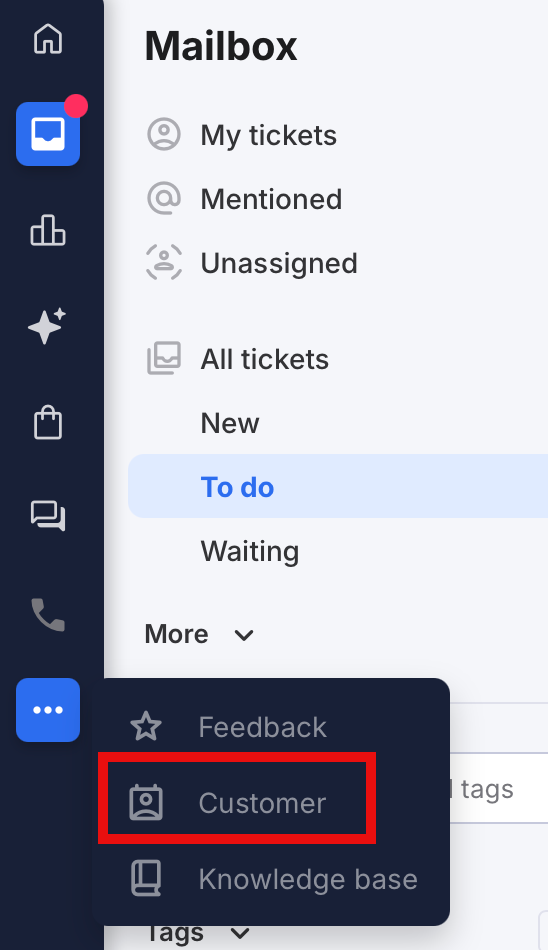
Note that deleting a customer's data is permanent and cannot be undone, ever.1. Go to the More Actions (three dots) menu item in the sidebar and select Customer:
2. The list of customer profiles is displayed. Position the cursor over the customer you want to delete to display a More Actions (three dots) button. Select More Actions > Delete customer data:

3. Read the warning (the action cannot be undone) and confirm.
A message is displayed that reads "Deletion started".
Erasure runs in the background and usually takes a few minutes.
Requesting deletion twice for the same customer is safe: a second request is rejected while the first is still running.
Further Reading
Do you use AI Agents or Chatbots in eDesk? Most jurisdictions insist you disclose use of AI. Learn more here.