Policies are one of the most important tools you can provide to your AI Agents. They act as the rulebook that tells the AI how the business works - for example, the time window for customers returning an item, what shipping methods are offered, what counts as a warranty issue, or when an order can be cancelled.
This guide explains what policies are, how the AI uses them and how you should structure your policies to best support your AI Agents to help them deliver the very best customer support.
Before you start
- You'll need an Admin or Team lead account or access Agents and the Policies permission
- See here for pricing information for AI Agent and AI Assist.
01 Introduction to Policies
A policy is a clearly written description of how the business handles standard scenarios, such as:
- Returns
- Cancellations
- Shipping
- Warranties
- Escalation processes
- Marketplace exceptions (Amazon, eBay, Etsy, etc.)
High-quality policies help the AI Agents deliver:
- Accurate decisions
- Correct handling per channel/marketplace
- Policy-compliant, brand-safe replies
- Faster replies
- Reduced escalations to human Agents
02 How Policies are used
AI Agents are usually set up to use Procedures together with source information like Training Content and the conversation history to auto-reply to customer's messages and perform actions like Accept Cancellation request. However, if the AI Agent can't find a Procedure that matches the Type of ticket and Extended Coverage is enabled, it will then assess if it can auto-reply with confidence using Instructions, Policies, and the conversation history.AI Assist uses Instructions, Policies, and Training Content to help human Agents by generating suggested replies in tickets, which the human Agent can then review and use if appropriate.
If using Policies, the AI looks for a policy that's relevant to the customer message, based on:
- Type
The type of ticket as classified by the AI, e.g. Cancellations - Channel
The channel from which the ticket arrived, e.g., brand website, an eCommerce Marketplace etc. - Country/region
- Product type
E.g., auction, custom item, electronics. - Any marketplace-specific rules.
Once it finds a matching policy, the AI uses the rules in the policy to:
-
Determine whether something is allowed
-
Understand time windows
-
Check for exceptions
-
Pull in relevant steps, such as “how to return”
-
Follow marketplace-enforced rules
If more than one policy matches, the AI Agent will use the most specific policy, e.g., it will choose to use Amazon-US rules in preference to a general return policy.
03 Guidelines for creating your Policies
Creating policies is simple, but it's important that you observe the following guidelines:
✔ Keep policies grouped by topic
Each policy should cover only one area. For example, a dedicated policy for each of the following:
-
Return Policy
-
Warranty Policy
-
Shipping Policy
-
Cancellation Policy
-
Escalation Policy
-
Marketplace-specific rules (Amazon, eBay, Etsy, etc.)
This will make your policies easy for the AI to match.
✔ Include where the policy applies
Customers should clearly mention:
-
For which channels (e.g., website, Amazon, eBay) the policy applies
-
For which countries the policy applies
-
Which product categories (e.g., custom items, auctions) does the policy applies
-
Any seasonal conditions (e.g., holiday returns) to which the policy applies.
This prevents the AI Agent from using the wrong rule for a marketplace, product, etc.
✔ Write rules as clear, direct statements
You'll write your policies in plain English. The AI performs best with simple and direct rules, such as:
-
“Returns are allowed for 30 days from the date of delivery”
-
“Perishable goods may not be returned”
-
“Orders can be cancelled within two hours of placing the order”
-
“Warranty covers manufacturing defects only”
Avoid storytelling, marketing language, or long paragraphs. Ensure that the AI Agent has access to the relevant data to calculate any rule criteria. For example, if you state that. 'Returns are allowed for 30 days from the date of delivery', then the AI will only be able to act on this for channels which have access to the 'Delivered' delivery status.
✔ Include important exceptions
Policies should explicitly list:
-
Product-category exceptions
-
Shorter or longer return windows
-
Items that cannot be returned
-
Marketplace-imposed restrictions
The AI will automatically apply these when relevant.
✔ Add instructions for the customer
Where helpful, you can include step-by-step instructions, such as:
-
“Provide proof of purchase”
-
“Ship the item to the repair centre”
-
“Print prepaid shipping label”
These are used by templates to craft accurate replies.
04 Checklists for specific Policies
To help you create high-quality policies, we've listed the information that should be in the following standard policies:Return Policies should include:
-
Which channels do they apply to
-
Regions/countries covered
-
How long the return window is and when it starts (delivery or purchase)
-
Any restocking fees
-
Exceptions (e.g., headphones → 14 days)
-
Required steps to complete a return
-
A link to the returns page on your website
Warranty Policies should include:
-
Channel and country applicability
-
Warranty length (e.g., 24 months)
-
What is covered
-
What is not covered
-
Steps to make a claim
-
Link to the warranty page on your website
Shipping Policies should include:
-
Where the shipping policy applies
-
Available shipping methods and estimated delivery times
-
Free-shipping thresholds
-
Regions they do not ship to
-
How customers track their orders
-
Link to the shipping policy on your website.
Cancellation Policies should include:
-
Which channels/countries they apply to
-
Whether cancellations are allowed
-
The time window (e.g., within 2 hours)
-
What order statuses can be cancelled
-
How customers cancel
-
Link to the cancellation policy on your website
Escalation Policies should include:
-
Where the rule applies
-
What triggers an escalation (e.g., no response in 48 hours)
-
How the customer is escalated (phone, email, chat)
-
Expected response time
05 Marketplace-specific examples
Marketplaces sometimes have requirements that must override your own rules. In these cases, you must add their rules to a dedicated policy for that marketplace. The policy topic must include the Marketplace name and the scenario covered by the policy to help the AI choose this policy in preference to a generic policy for a similar scenario. Below are some real-world examples of marketplace-specific rules written in plain English.
eBay Auction Sales — No Returns
-
Applies to eBay (US)
-
Auction items cannot be returned unless they’re not as described
-
This rule is enforced by eBay, not the seller
-
Useful reference: https://pages.ebay.com/returns/
eBay Return Case Flow
-
eBay controls the full return-case process
-
Sellers cannot issue refunds directly or close cases themselves
-
Only buyers can close a return case
-
If a refund is needed, buyers must reopen it as a refund case
Amazon A-to-Z Guarantee
-
Amazon enforces a 30-day return window.
-
Sellers must comply even if their store rules are stricter.
Walmart Holiday Returns
-
Holiday purchases must follow Walmart’s extended return periods.
Etsy Custom Items
-
Custom products cannot be returned.
-
This policy is enforced by Etsy.
06 How do I create Policies?
1. Go to the AI section > Policies.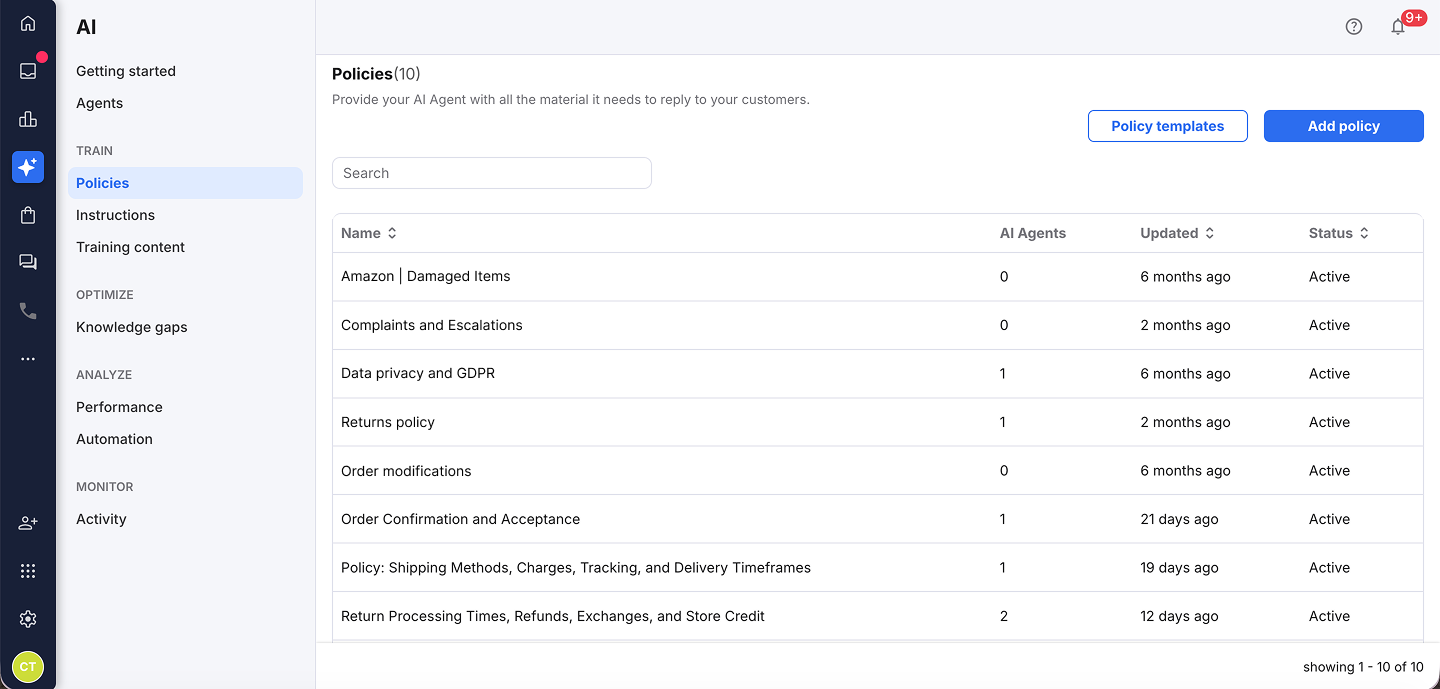
2. You can now use one of our templates as a basis for your policy, or create the policy from scratch.
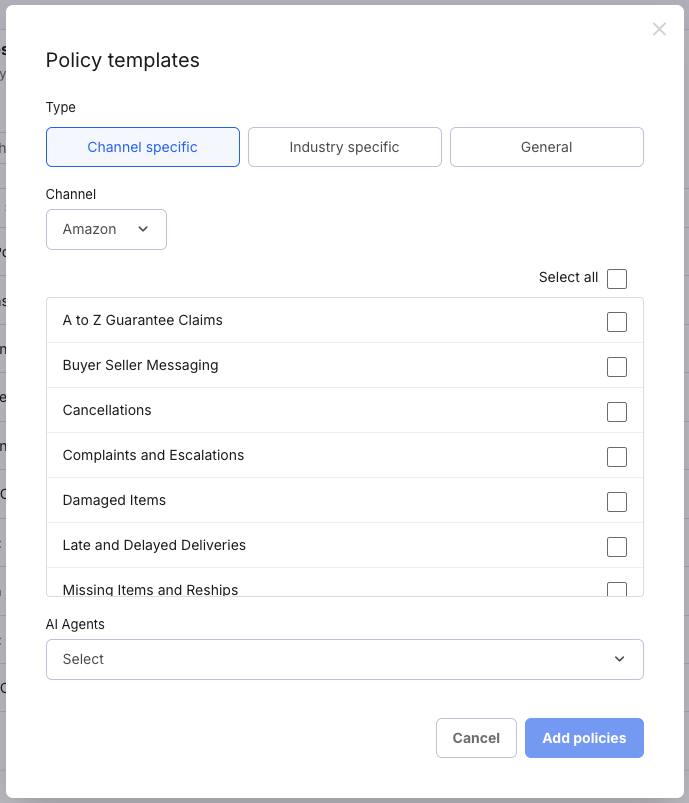
A) We’ve created a selection of policy templates to help you get started, including options tailored to specific marketplaces, industries, and more general use cases.
You can review each template and its content before adding it to your account here.
To create a policy using a template, select Policy templates and select the ones you would like to create and click Add policies.
B) To create the policy from scratch:
Select Add policy.
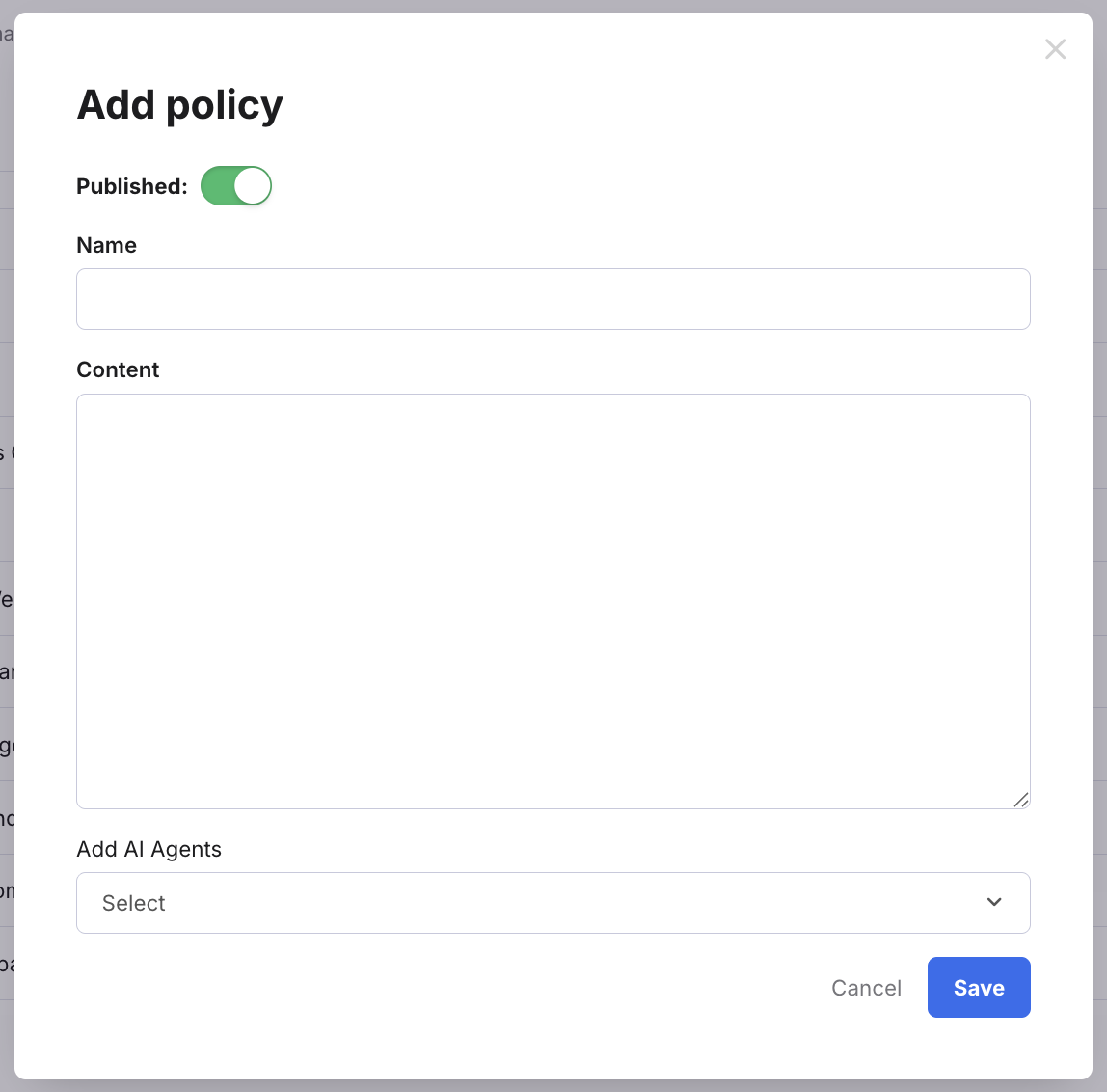
Complete the fields:
- Published
The slider is enabled by default, which means the policy will be available for the AI Agent to use as soon as it is saved. - Name
Enter the topic name, e.g., Amazon USA Returns Policy - Content
Enter the rules.
Further reading
To learn more about AI Agents, see here.
To learn how to set up your AI Agents, see here.