eDesk has two AI options that take the load off your support team and make it easy to consistently deliver great customer care. First, the AI Agent - which can answer tickets and perform actions just like any member of your Care Team - and then, AI Assist - which adds a suggested reply to tickets that can be reviewed and sent by the Care Team.
This help file explains what each AI option does, how they decide which one handles a given ticket, and how tickets are classified when they arrive.
Before you start
- You’ll need an eDesk account to start using the AI.
- An Admin user can set up the AI Agent, which is available to all eDesk clients. AI Assist is an Add-on. See here for pricing information.
01 eDesk's AI
eDesk provides two AI options that help you answer your customer queries accurately and efficiently.The AI Agent
eDesk’s AI Agent automates up to 65% of your customer support across every ecommerce channel. The AI Agent is available by default. You can set up multiple AI Agents for different channels. View billing information here.
What it does
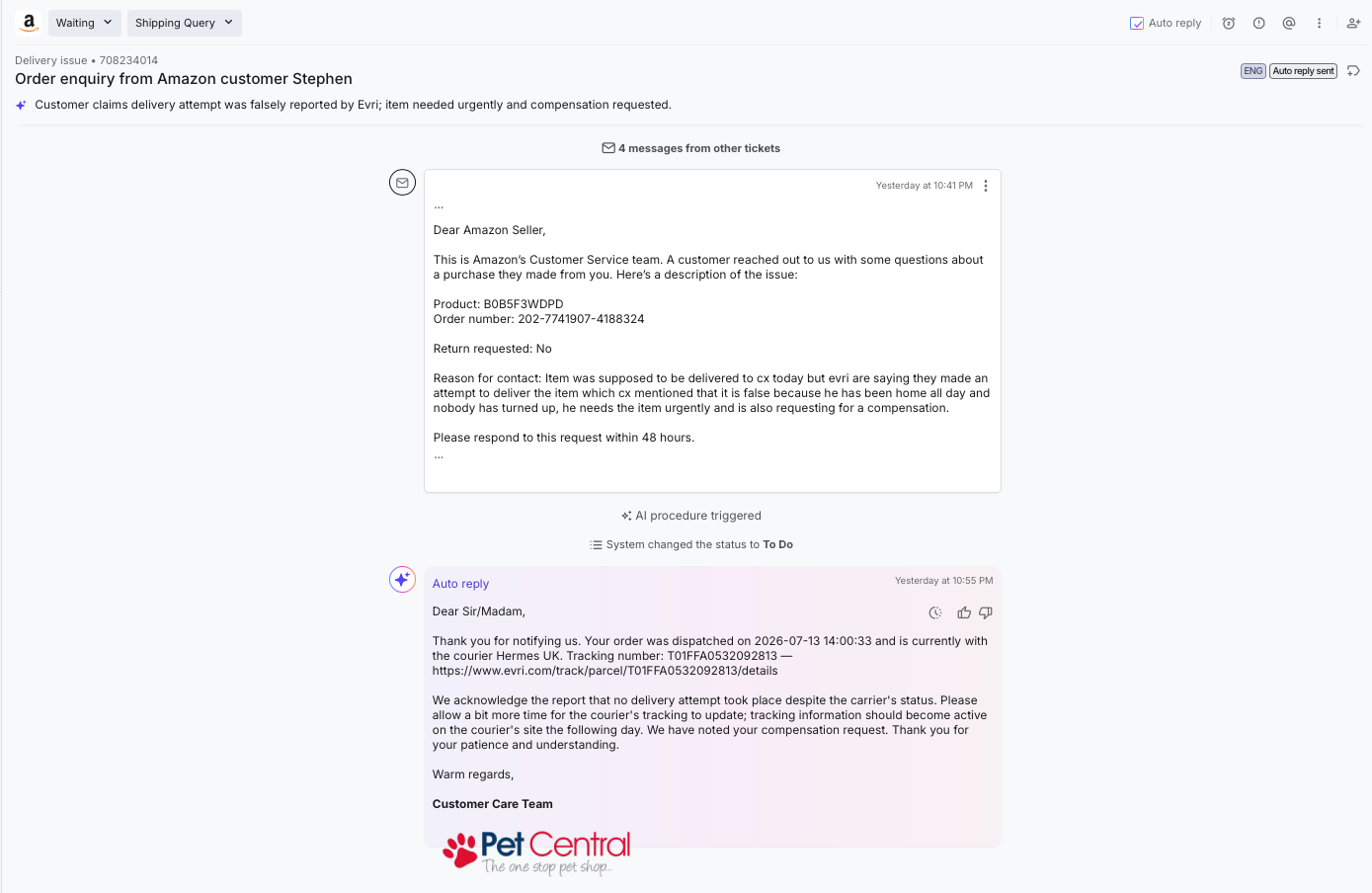
- Auto-replies on tickets that a matching Procedure handles (if the Procedure is in Auto and the ticket doesn't trip guardrails). Procedures are flowcharts you create that the AI Agent will follow. Learn more here.
- The reply is based on Procedures, Training Content, order data, attachments, conversation history.
- Can also perform actions such as issuing refunds, tag tickets, cancel orders.
"Extended coverage" behaviour
If no Procedure matches the ticket or the AI Agent has no access to a suitable Procedure, you can optionally instruct it to attempt to auto-reply using Instructions/Policies/order data/conversation history. It will perform limited actions - these actions must be specified in the Instructions.
Learn how to set up the AI Agent.
AI Assist
AI Assist does not auto-reply. Instead it assists your agents with suggested replies, tone adjustments, and faster replying within every ticket. View billing information here.If you have AI Assist and have not set up an AI Agent for the channel that the ticket comes in from, then AI Assist will be the only AI features in use.
If an AI Agent has been set up for the channel and can auto-reply to this ticket, then AI Assist will not be needed. If the AI Agent cannot auto-reply to this ticket, then AI Assist will create a suggested reply in the ticket, which your support team can then review and send if they like.
What it does
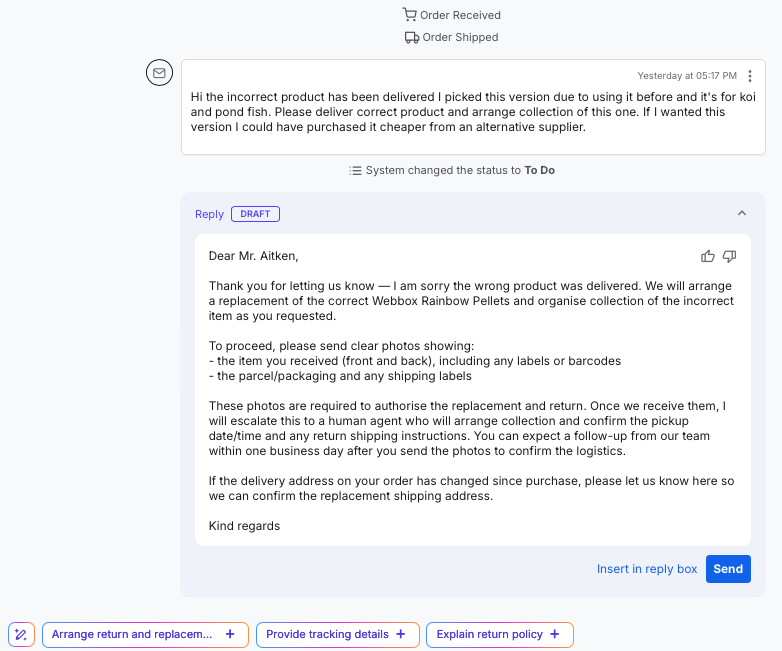
- Generates a suggested reply in the Reply Box and also provides alternative prompts for the reply, for example, "Confirm order number" or "Offer goodwill credit", which are displayed below the Reply Box. The human Agent selects a prompt to display it in the Reply Box.
- The suggested reply is based on Instructions and Training Content, plus order data and conversation history. It does not read Procedures.
- It cannot perform actions and cannot auto-reply. A human Agent always reviews the suggested reply.
- The human Agent can either edit and send the first suggested reply, select the prompts to view alternative suggested replies, or type in their own original reply.
02 What tells the AI Agent to auto-reply in a ticket?
The AI Agent will handle a ticket (auto-reply or execute an action) only when all of the following are true:
- The channel is assigned to the AI Agent
Learn more here. The AI Agent only sees tickets from channels that are assigned to it. Messages that arrive from other channels are left for a human Agent (and AI Assist if purchased). - A matching Procedure is assigned to the AI Agent
A Procedure that is assigned to the AI Agent matches this type of ticket and is in Auto mode. If the AI Agent can't find a suitable Procedure, then it will either leave the ticket for a human Agent or, if Extended coverage is enabled and if there's enough information in Instructions/Training Content/Policies to enable it to answer with confidence, it will auto-reply with the information it has. - The ticket doesn't trip any guardrails
The AI Agent can have guardrails applied, which for example, excludes tickets with angry sentiment from being auto-replied by the AI Agent. These will be left for a human Agent. - The message looks like an actual ask
Not an obvious thank-you, an auto-reply, a marketplace bounce, or an unsubscribe footer. - A human Agent doesn't already have the ticket open
No human agent is currently typing into the Reply field or has just replied on the ticket. - A human Agent has not unticked the Auto reply checkbox at the top of the ticket
This prevents the AI Agent from auto-replying to this ticket.

Whenever the AI Agent skips a message, the reason is recorded — so you can always see why nothing happened on a given ticket.
Further Reading
To learn more about AI Assist, see here.
To learn about Procedures, see here.